Renoise Forums: Blockfish: Howto. - Renoise Forums

Jump to content

Page 1 of 1

Blockfish: Howto. Compressor Joy

#1 User is offline   mr_mark_dollin 

  • Guruh Motha Fakka is Levitating and Knows Everything About Renoise Member
  • PipPipPipPipPipPipPipPipPipPipPipPipPip
  • Group: Normal Members
  • Posts: 2179
  • Joined: 03-May 03
  • Gender:Male
  • Location:In the Pattern Matrix.
  • Interests:Quiet Revolutions.

Post icon  Posted 20 November 2008 - 03:04 AM

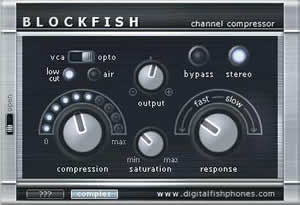
I just can't contain it any longer! Let me share the love for this little gem freebie VST effect called blockfish.
Posted Image
Posted Image

Let's face it, all DSP compressors sound different and behave differently to what the settings say they should be acting like. Compression is such a fundamental part of mix management at the channel level, not only for shaping dynamics, but also for shaping tone colour. Here's where I share a little trade secret: I'm a blockfish junkie and proud of it!

...And no, this compressor isn't the cure all for all mix needs, so let's clear that assumption immediately. However, once you learn how to use this little tool you may just find that it quickly becomes you 'goto compressor' for many things. And there are a gazillion different ways you could set it up, but I'm going to share with you my settings that more or less get what I like. First, let's look at all the parameters:


Front Panel (what you see in front of you when you open up the plugin's UI)

- VCA / OPTO Switch > This switches the compressor between it's two modes of reacting to the input signal. VCA stands for Voltage Controlled Amplitude a refers to how standard compressors simply react in real-time. OPTO is short for Optical, which refers to a classic method where the compressor uses an optical sensor to read the input signal and govern how the compressor works. How the plugin emulates this magical mode is to use a buffer of a short amount of input signal to read the input data. More on this later...

- Low Cut > This switch when active tells the compressor to ignore below a certain frequency and compress signal only above that cut. When off, the compressor acts on the entire frequency range of the input.

- Air > When on the Air button engages an exciter that works in tandem with the compressor action, so it effectively makes up for 'brightness' lost due to the hardness of the compression (which is common in all DSP compressors).

- Output > A simple post-volume knob that effects the output volume.

- Bypass > Simply bypasses the effect for A/B testing.

- Stereo > When off the plugin mixes the L and R channel of the input signal into a two channel mono output.

- Compression > This knob does two things at once. Firstly, the more you add to this parameter the 'deeper' the threshold where dynamics are altered. Secondly, the more you add to this parameter the post-gain markup is added in respect to how deep the threshold is. Put simply, the more you turn this knob, the more you squash the sound without general gain loss. The amount of compression effects the other aspects of the plugin, as will be explained further down.

- Saturation > The knob effects how much saturation the compressor employs, both generally over the whole input sound, as well as on transient dynamics (like peaks) depending on how much 'compression' is selected.

- Response > A curious parameter that seems to combine both 'attack' and 'release' aspects of compression. The lower the setting on this knob the faster the response. The response is also related to what mode the compressor is in, which is static in VCA mode, but configurable in OPTO mode: see below.

- Complex > This button is down on the bottom left of the plugin interface. It allows you to select two modes of adjustment that affect the sound of the 'Compression' parameter. Disengaged it sounds like most DPS compressors, generally transparent; but when engaged Complex sounds fuller and pleasantly louder depending on how much compression you employ.

- Open switch > On the very left of the plugin interface there is a tiny switch to access the back panel controls. Let's look at them now.

Back Panel

- Low Cut Freq > When the 'Low Cut' button is active you can select the frequency cut point here with this knob. The higher it is set the more lower end is let through un-compressed.

- Air Freq > When the 'Air' button is active you can select the frequency of the general air emphasis. Pushing it right up shows that it can go up to the very high audible frequencies.

- Air Level > Related to the 'Air' aspect of the compressor, this knob controls the amount of exciter emphasis relative to the amount of compression set. The more you add to the level the more boosted the selected air frequency you have chosen. This makes up beautifully for produced dullness from DSP compression and different input sounds can benefit from different amounts of compensation.

- Opto Memory > When the compressor is set to OPTO mode, this knob controls the buffer size for reading the input signal. This in turn effects how snappy or quick the 'Response' of the compressor is, and is quite useful for getting the right attack when using a really short response time. The amount of memory also effects how gracefully the OPTO mode works, a smaller buffer compromises the sound.

- Sat Emph Freq > This controls the frequency that the compressor's saturation process places an emphasis. Think of it as a tone control that determines the colour of the 'rip' of the saturation.

- Dynamic Sat > This controls the amount of saturation that is applied relative to three other parameters: the amount of compression; the amount of saturation; and the saturation emphasis frequency. The more of this parameter you apply the more it naturally softens transient peaks in the input signal.


OK! So that's all the parameters explained... Now let's look at how I generally like to use Blockfish - my default settings if you will. I'm a fan of smooth vintage analog sounds, so this may not be necessarily for you, but do try it out on a few things and you may just find it sounds pretty sweet:

- OPTO mode.
- Low Cut on.
- Air on.
- Complex on.
- Stereo processing.
- Compression on as hard as appropriate.
- Response set as low as it can go.
- Saturation set at half or higher.
- Low Cut Freq around the middle, depending on input sound.
- Air Freq usually right up as high as it can go.
- Air Level usually up all the way, but sometimes not much if the input is bright already.
- Opto Memory at midway, although less if I need a snappier sound.
- Sat Emph Freq as low as it can go: this is really the BEST spot for this setting, especially if you're grinding sound hard into the compressor, like megaphoning dub echo etc.
- Dynamic Sat as high as it can go.
- Output set at the appropriate level - sometimes I automate this depending on mix flow/dynamics.

This brings to life so many dull or cold things in my mix like no other compressor can. I usually don't venture too far from the above settings: maybe a little less air for processing my tube-mic-pre recordings; a lot more saturation for beefing up drums; different low cut positions for keeping bass and kicks punching; and so on...

Try it out! Let me know if you find this of use.

:walkman:
mmd = mr_mark_dollin
Stormformer Productions Website
-Production // Mixing // Mastering-
Twitter: @mr_mark_dollin // @stormformer
Moar = bandcamp // Facebook // soundcloud // flickr
0

#2 User is offline   s-n-s 

  • Guruh Motha Fakka is Levitating and Knows Everything About Renoise Member
  • PipPipPipPipPipPipPipPipPipPipPipPipPip
  • Group: Normal Members
  • Posts: 1746
  • Joined: 05-July 07

Posted 20 November 2008 - 03:44 PM

thanx for the tips.i will try using this tonight and post back :yeah:
MY nEW PRoJEct

http://soundcloud.com/eroticore-stench
FACEBOOK
http://www.facebook....13814538&ref=ts

listen to ALL my old albums here

www.virb.com/scandinaviannoizesyndicate
0

#3 User is offline   Hooligan/DCS 

  • Big GrandDaddy Member
  • PipPipPipPipPipPipPipPip
  • Group: Normal Members
  • Posts: 455
  • Joined: 15-April 08

Posted 20 November 2008 - 04:02 PM

/me agree with Foo
0

#4 User is offline   crytek 

  • Guruh Motha Fakka is Levitating and Knows Everything About Renoise Member
  • PipPipPipPipPipPipPipPipPipPipPipPipPip
  • Group: Normal Members
  • Posts: 1002
  • Joined: 02-March 06
  • Gender:Male
  • Location:Houston, TX

Posted 20 November 2008 - 09:21 PM

I have this plug but never got into it. I'll check it out.

Thanks.
Kit List:

Custom Built PC: Intel Core 2 Quad Q9550 @ 2.83GHz | 4 Gigs ram | 64 Bit Windows 7  |  MOTU Traveler | Emu E4xt Ultra Sampler | M-AUDIO Midi sport UNO | Novation Xiosynth | Reaktor 5 |  FM8 | Fostex PM.05 Monitors | Boss OS2 Overdrive/Distortion Guitar Pedal | Novation Nocturn 49 | Behringer BCF2000 | ART Pro VLA II HW Compressor | Rane Scratch Live (SL1) | 350 GIG External HDD | 2 X Technics turn tables | Pioneer DJM 600 Mixer | Vinyl (From various generes) oh, and Posted Image


NEW! | For Sale | Adding soon...

QUOTE(sunjammer @ Mar 31 2009, 09:58 AM) View Post
Sequencers are like martial arts. It's about how good you are with them, not how good the tool is.
0

#5 User is offline   annide 

  • Big Masta Member
  • PipPipPipPipPipPipPipPipPip
  • Group: Normal Members
  • Posts: 524
  • Joined: 23-August 05
  • Gender:Male
  • Interests:Graphics, Music, Playing out, Fishing, Movies, Books, Extraterrestrials, Females, Psychosocial, Weather ;D

Posted 20 November 2008 - 10:24 PM

I've been using this for several years.
especially on BASE and VOCALS.
untz kntz untz k-ntz, chkzhk!
0

#6 User is offline   MartinIR 

  • Advanced Member
  • PipPipPip
  • Group: Normal Members
  • Posts: 83
  • Joined: 20-November 07

Posted 22 November 2008 - 08:53 PM

Thanks for sharing!
Very detailed explanation of what everything does which will help a compressor noob like me.
I'll try this one to see if it makes some "magic" to some of my tracks :)

This post has been edited by MartinIR: 22 November 2008 - 08:54 PM

0

#7 User is offline   teknocide 

  • Chief Above Chief Member
  • PipPipPipPipPipPip
  • Group: Normal Members
  • Posts: 352
  • Joined: 03-April 03

Posted 22 November 2008 - 11:17 PM

Foo,
thank you so much for this writeup; there is no such thing as too much knowledge.


... and in case I'm too subtle, I'm trying to persuade you into writing more of this kind.. ;)
0

#8 User is offline   danoise 

  • Guruh Motha Fakka is Levitating and Knows Everything About Renoise Member
  • PipPipPipPipPipPipPipPipPipPipPipPipPip
  • Group: Designer
  • Posts: 1828
  • Joined: 21-January 03
  • Gender:Male
  • Location:.dk
  • Interests:wildlife + urban trekking

Posted 23 November 2008 - 03:24 AM

Sound like this compressor could find a new home in my VST folder!!

Great tutorial, Foo?
Tracking with : Mac Mini, MSI Wind U100, MAudio FW Audiophile, Novation NIO 2/4 + Remote SL MKII + Nocturn + LaunchPad, Das Keyboard, KRK 8" Rokit MKII
0

#9 User is offline   kazakore 

  • Guruh Motha Fakka is Levitating and Knows Everything About Renoise Member
  • PipPipPipPipPipPipPipPipPipPipPipPipPip
  • Group: Normal Members
  • Posts: 1779
  • Joined: 06-October 05
  • Gender:Male

Posted 28 November 2008 - 09:39 AM

Haven't yet found a freeware compressor I have been fully happy with but you make this sound like it may be just the tool for the job. Will definitely give it a proper look when I get the chance.
0

#10 User is offline   rendemon 

  • Advanced Member
  • PipPipPip
  • Group: Normal Members
  • Posts: 111
  • Joined: 17-November 07

Posted 04 December 2008 - 01:45 PM

Thats great, gonna check that out, at the weekend.
Thank you foo? ! :D
0

#11 User is offline   carmazine 

  • Super Advanced Member
  • PipPipPipPip
  • Group: Normal Members
  • Posts: 134
  • Joined: 29-December 05

Posted 28 December 2008 - 03:33 AM

Thanks Mark, I got addicted :D

notebook Fujitsu-Siemens Lifebook S6120d
cpu Pentium M 1,6 ghz
os WinXP SP2
audio there is no
0

#12 Guest_kaneel_*

  • Group: Guests

Posted 29 December 2008 - 11:59 AM

Foo... this must be written NOW in the wiki!

#13 User is offline   karlMax 

  • Member
  • PipPip
  • Group: Normal Members
  • Posts: 22
  • Joined: 19-December 08
  • Location:Italy
  • Interests:computer games, movies, music, friends, lazing, some programming, guitar, lazing (didnt I say it yet - did I? xD), philosophy, cultivating, petz. <br />And, yes... quite everything can interest me, its only a matter of &quot;how long&quot;? xD

Posted 29 December 2008 - 12:05 PM

View Postkaneel, on Dec 29 2008, 12:59 PM, said:

Foo... this must be written NOW in the wiki!


I agree... 3rd time I come on the forum and search for this thread to check the tut!!! xD

cpu AMD Athlon 1.8 GHz
ram 1Gb DDR os WinXP SP3
audio
Edirol UA-4fx USB

inspiration bottles of "matusalem" ron, some pink flamingos

"God I am the american dream, but now I smell like vaseline" (F. Zappa)
0

#14 User is offline   Dr Skunk 

  • Chief Above Chief Member
  • PipPipPipPipPipPip
  • Group: Normal Members
  • Posts: 265
  • Joined: 06-February 06

Posted 29 December 2008 - 12:46 PM

Nice :walkman:
0

#15 User is offline   00.1 

  • Big Masta Member
  • PipPipPipPipPipPipPipPipPip
  • Group: Normal Members
  • Posts: 584
  • Joined: 21-September 07
  • Location:Paterson NJ

Posted 31 January 2009 - 05:41 AM

View PostFoo?, on Nov 19 2008, 08:04 PM, said:

...Try it out! Let me know if you find this of use...

I'm just getting into evaluating instruments for a project, this is a keeper. Thanks for the useful tutorial.

I tried it with µtonic = excellent results.
OSX 10.4.11

xrns v2.5 chords
0

#16 User is offline   Polybius 

  • Member
  • PipPip
  • Group: Normal Members
  • Posts: 45
  • Joined: 15-November 07

Posted 12 February 2009 - 05:55 PM

I like these plugins a lot too. There is a drawback tough, quoted from the U-HE forum from KVR:

Quote

Users of the freebees should also be aware that, since they are now quite old, they don't work with automatic PDC (=don't declare their latencies to the host), as far as I know.


I don't know how negative this effect is for Renoise, nor have i noticed it. But it should be mentioned.

Also, the guy who programmed Blockfish now works for Magix, and has written a new compressor called "Am-Track", among other great plugins. More here:

http://www.samplitud...st/amtrack.html

p.s. looks yummy doesn't it :):

Posted Image

This post has been edited by Polybius: 12 February 2009 - 05:56 PM

0

#17 User is offline   00.1 

  • Big Masta Member
  • PipPipPipPipPipPipPipPipPip
  • Group: Normal Members
  • Posts: 584
  • Joined: 21-September 07
  • Location:Paterson NJ

Posted 12 February 2009 - 09:01 PM

View PostPolybius, on Feb 12 2009, 10:55 AM, said:

I like these plugins a lot too. There is a drawback tough, quoted from the U-HE forum from KVR:

thanks for the tips
OSX 10.4.11

xrns v2.5 chords
0

#18 User is offline   eis 

  • New Member
  • Pip
  • Group: Normal Members
  • Posts: 7
  • Joined: 12-November 08

Posted 15 April 2009 - 10:21 AM

hey, nice breakdown, but i'd say it's not that accurate!

for more understanding and accurate information i'd advice to check out the manual, it everything inside of it that you need.

for example, see what's said about opto memory:

Quote

The gain control element consisting of a virtual light source and a photo resistor has a
certain 'time lag' than can be adjusted here. Turned fully clockwise, the circuit has maximum
memory, meaning that high signal levels will have some sort of 'charging' effect and elongate
the release time. Turn anti-clockwise for fast, 'in-your-face' sounds

0

Page 1 of 1


Fast Reply