
We can't find the internet
Attempting to reconnect
Something went wrong!
Hang in there while we get back on track
ASCII Dancer
by
Conner_Bw
ASCII Dancer
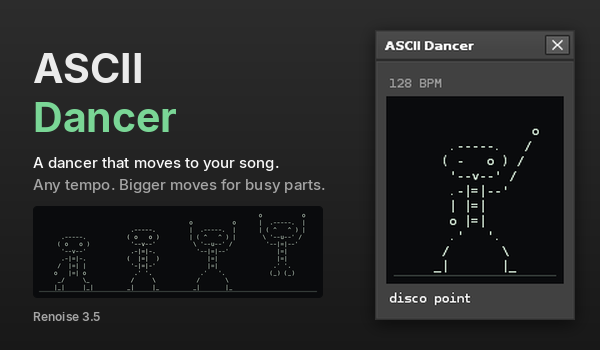
ASCII Dancer opens a small window with a dancer made of text characters. Press play and it dances to your song. Press stop and it stands still and waits.
The dancer does not listen to the audio. Renoise does not give tools the audio level, so the dancer reads the transport and the notes in your patterns instead.
Opening it
- Choose Tools > ASCII Dancer… in the main menu.
- Or assign a key to Global > Tools > Show ASCII Dancer in Edit > Preferences > Keys.
The window can stay open while you work. It never changes size.
How it dances
- On the beat. Each frame comes from the playback position, so loops, jumps and tempo changes stay on the beat. The body dips on each beat, and the text gets brighter.
- Moves. Groove, sway, shuffle, twist, disco point, raise the roof and spin. The name of the current move is shown under the dancer.
- Quiet or busy. The dancer counts the notes in your patterns. Quiet parts get calm moves such as groove and sway. Busy parts get bigger moves such as raise the roof and spin. A move usually lasts two bars or more.
- Accents. When three or more notes start on the same line, the dancer may jump or put its hands up for a moment.
- Any tempo. The dancer steps at 80 to 160 BPM. Faster songs make it dance in half-time or quarter-time. Slower songs make it dance in double-time. It keeps a mode until the tempo moves well outside that range, so it does not switch back and forth. The line above the dancer shows the BPM and the mode.
- Easy to follow. Each frame stays on screen for at least 80 ms, even at very high tempos.
Muted tracks and hidden note columns are not counted.
Install
Drag com.dac514.AsciiDancer.xrnx onto Renoise. Renoise 3.5 or newer is needed.
Changes in 1.01
- The tool page on renoise.com now has a cover image and a thumbnail.
- This page now describes the tool. The dancer is the same as in 1.00.
Changes in 1.00
- First release.
External Links
Homepage
Liability exclusion: You are about to download and install software from a third-party provider. This software was not developed by Renoise and is listed here in a summarised form purely as a convenience for our users. Renoise takes no responsibility for any malfunction, incompatibility, or damage caused by or otherwise arising from the use of the software. In the case of problems with the installation or use of the software, please contact the relevant developer.
Back to tools