
We can't find the internet
Attempting to reconnect
Something went wrong!
Hang in there while we get back on track
ChordSlop
by
Conner_Bw
ChordSlop
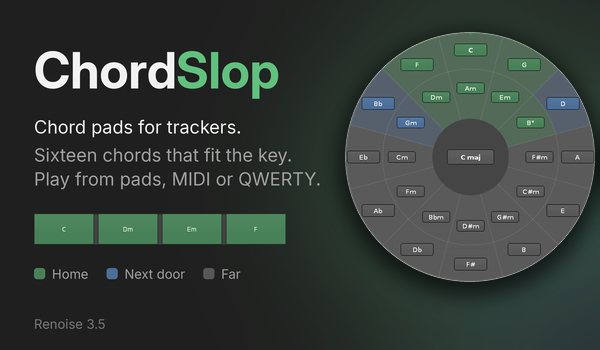
Play a full chord with one press. ChordSlop gives you 16 chord pads and a circle of fifths that shows which chords fit your key. Start from one of 20 presets, or fill the pads from the circle. Play with the mouse, a MIDI controller or the computer keyboard. When edit mode is on, ChordSlop writes each chord into the pattern.
Start here
- Choose Tools > ChordSlop….
- Choose a Key and a Preset. The pads now hold chords that belong together.
-
Press the pads. The keys
z s x dplay the first row. - Enable edit mode in Renoise and press a pad. ChordSlop writes the chord at the cursor.
Point the mouse at any control to read what it does. You can also assign a key to Global > Tools > Show ChordSlop.
The circle
The circle shows how far each chord is from your key. Major chords sit on the outer ring, and their relative minors sit inside. Neighbours share notes, so a change between them sounds smooth. A change across the circle sounds like a big step.
- Green chords are the seven chords of the key. In C major, they are F, C, G, Dm, Am, Em and B°.
- Blue chords are one step outside the key. Each one changes one note. In C major, they are Bb, Gm and D.
- Gray chords are far from the key.
In a minor key, the major chord on the fifth degree is green too.
The tonic chord sits at the top, and the circle turns when the key or the mode changes. Clear Animate to make it change at once. Click a chord to hear it. While a pad plays, its chord is lit on the circle, so you see where your progression goes.
To fill the pads from the circle, switch from Play to Assign to pad. Each chord that you click goes to the selected pad, and ChordSlop selects the next pad.
The pads
Each pad has the colour of its chord on the circle. Under it, you see its roman numeral and its computer key. Click a pad to select it. The editor under the grid changes its root, chord type, inversion and octave.
Power chords and suspended chords have no third. Such a pad lights the major or the minor chord on its root, whichever one is closer to the key.
Key and mode. Choose a root note and one of seven modes. When Transpose pads with key is on, the pads move with the key. When it is off, the pads keep their chords, and the colours show how they fit the new key.
Fit pads to key. Under the pads, ChordSlop counts the pads that are in the key. Fit pads to key moves all pads together to where the most of them are in the key. It never changes a single pad, so it is active only when a better place exists.
Presets. The presets cover pop, 1950s progressions, Pachelbel’s Canon, jazz, bossa nova, gospel, neo-soul and lo-fi hip hop. Others cover minor keys, Dorian, Phrygian, Lydian, Mixolydian, power chords and suspended chords.
- Many rows are a progression that you play from left to right.
- No two pads play the same notes. A chord that returns uses another inversion or octave.
- Presets follow the key, and most of them set their own mode. In that mode, every pad is green.
- If you change the mode later, ChordSlop builds the preset again in the new mode. The jazz ii V I becomes a minor ii V i.
After you edit a pad, the preset name gets an asterisk. Choose the preset again to restore it. Save stores your own layout under a name, and Delete removes it. A saved layout follows the key like the factory presets.
Playing
Mouse. Press a pad or a chord on the circle. Release the button to stop the chord.
Computer keyboard. The ChordSlop window must have the focus. The keys
z s x d c v g b h n j m play pads 1 to 12, and q 2 w 3 play pads 13 to 16.
Clear QWERTY pads to send every key to Renoise.
MIDI. Choose your MIDI device. Then choose how its 16 notes map to the grid:
- MPK mini banks is the default. Bank A plays the top two rows and bank B plays the bottom two rows, as on the controller.
- Rows top to bottom puts the lowest note at the top left.
- Rows bottom to top puts the lowest note at the bottom left, as on a drum machine.
Low note is the lowest note of the controller pads. To set it, press Learn and hit that pad. ChordSlop records the velocity of each hit.
Remove the controller from Preferences > MIDI > In Device A/B in Renoise. If Renoise also reads the controller, edit mode records the pad note together with the chord.
Recording
The text at the bottom of the window tells you what a pad press will do.
- With edit mode off, the chord only plays.
- With edit mode on and the song stopped, ChordSlop writes the chord at the cursor. The cursor then moves by the edit step.
- With edit mode on and the song playing, ChordSlop writes the chord at the playhead. It writes the note-offs where you release the pad.
ChordSlop uses one note column for each note and adds columns when it needs them. Each chord is one undo step. The pads play the selected instrument, and recording needs a sequencer track.
Install
Drag com.dac514.ChordSlop.xrnx onto Renoise 3.5 or newer. The source code
and the issue tracker are at https://github.com/dac514/chordslop.