
We can't find the internet
Attempting to reconnect
Something went wrong!
Hang in there while we get back on track
MG DSP Quick Picker

Searchable DSP quick picker that lists native and plug-in effects, supports live filtering, keyboard and mouse navigation, and inserts the selected device before or after the currently focused DSP. Enter/double click inserts selected DSP after the currently focused one, Shift+Enter/Double click inserts it before. Shift+Backspace clears search query. Up/down arrows navigate through the lst. Esc closes the dialog. Update v.1.5 - 2026-08-04: - Added asterisk marker for Favorites plugins. Also Favorites are prioritized in the results and typing "Favorites" or "VST3 favorites" shows only the appropriate results. - Added right click menu to result items with various options DISCLAIMER: The tool is made using Claude AI. Feel free to edit and reupload the script if you find any bugs (which is very very likely). Always make a backup copy of your song before testing.
MG Track Color Rules

Automatically color tracks based on user defined keywords. Applies track colors from persistent keyword rules, with match and track-type filters, an interactive HSV color picker with synchronized RGB/HSV/HEX inputs, an optional background-blend setting for colored tracks, and an optional fallback color for Send tracks not matched by a keyword rule. DISCLAIMER: The tool is made using Claude AI. Feel free to edit and reupload the script if you find any bugs (which is very very likely). Always make a backup copy of your song before testing.
MG Picky Clipboard

Copy or cut notes filtered by note pitch or instrument. Captures vol/pan/delay, effect columns, orphan effects, and NOTE_OFF commands — all restored faithfully on paste. Supports selection-bounded operation. Useful for tracks with notes from multiple instruments, multisample drum instruments, etc. DISCLAIMER: The tool is made using Claude AI. Feel free to edit and reupload the script if you find any bugs (which is very very likely). Always make a backup copy of your song before testing.
MG Native DSP Floater

A floating controller for the selected Renoise native DSP, with live-synced parameters, presets, bypass, editable values, and per-parameter default reset by double-clicking its slider. DISCLAIMER: The tool is made using Claude AI. Feel free to edit and reupload the script if you find any bugs (which is very very likely). Always make a backup copy of your song before testing.
MG Theme Tweaker

MG Theme Tweaker lets you browse, search, group, edit, copy, paste, reset, and live-preview all colors used by the current Renoise theme, including global color and graphics settings. The main differences to the built-in Theme editor, are a serach box, copy/paste RGB/HSV values at once and edit colors by group instead of having to find all the controls that use the same color.  DISCLAIMER: The tool is made using Claude AI. Feel free to edit and reupload the script if you find any bugs (which is very very likely). Always make a backup copy of your song before testing.
MG Selection Loop Thingy

Loops a selected pattern range and can trace a sustained sample across patterns to restart playback from its original note trigger. V 2.0 update - 2026-07-24 • Added function that traces long autoseek samples across patterns and start playback from its original note trigger. • Fixed a bug where notes exactly at the start or end of the selection wouldn't trigger upon loop playback DISCLAIMER: The tool is made using Claude AI. Feel free to edit and reupload the script if you find any bugs (which is very very likely). Always make a backup copy of your song before testing.
MG Delete Unused Samples

Deletes unused samples from the selected instrument or all instruments. Checks note and velocity ranges against the song sequence. 2026-05-19 - Version 1.2 // Fixed a bug in the scanning algorithm. 2026-06-05 - Version 1.3 // Now works with phrases and sliced samples. DISCLAIMER: The tool is made using Claude AI. Feel free to edit and reupload the script if you find any bugs (which is very very likely). Always make a backup copy of your song before testing.
MG Song Renderer & Converter

Renders the complete Renoise song and converts it to MP3, FLAC, or OGG using FFmpeg installed in the user’s local data folder. Includes an encoder installer, song-folder destination and filename-template options, codec-specific settings, render and conversion progress, source and post-conversion waveforms, external audio-file waveform loading, and markers for peaks above 0 dBFS. WINDOWS ONLY V1.1 update - Added ability to keep five recent folders for export locations and the option to pin any of these - Added option to set custom Artist and Album metadata which are kept across sessions DISCLAIMER: The tool is made using Claude AI. Feel free to edit and reupload the script if you find any bugs (which is very very likely). Always make a backup copy of your song before testing.
MG Ultimate Random Performer

Generate random performances and arpeggios using granular parameters like scales, duration, panning, delay, vibrato and glide. DISCLAIMER: The tool is made using Claude AI. Feel free to edit and reupload the script if you find any bugs (which is very very likely). Always make a backup copy of your song before testing.
MG Welcome Screen

Non-modal welcome dialog shown at launch and on demand from the Tools menu, with recently saved and loaded songs side by side, six persistent pinned songs arranged in two columns, TextLink song entries with native theme hover highlighting, configurable built-in Renoise pin icons, and New Song / New Song (No Template) actions. 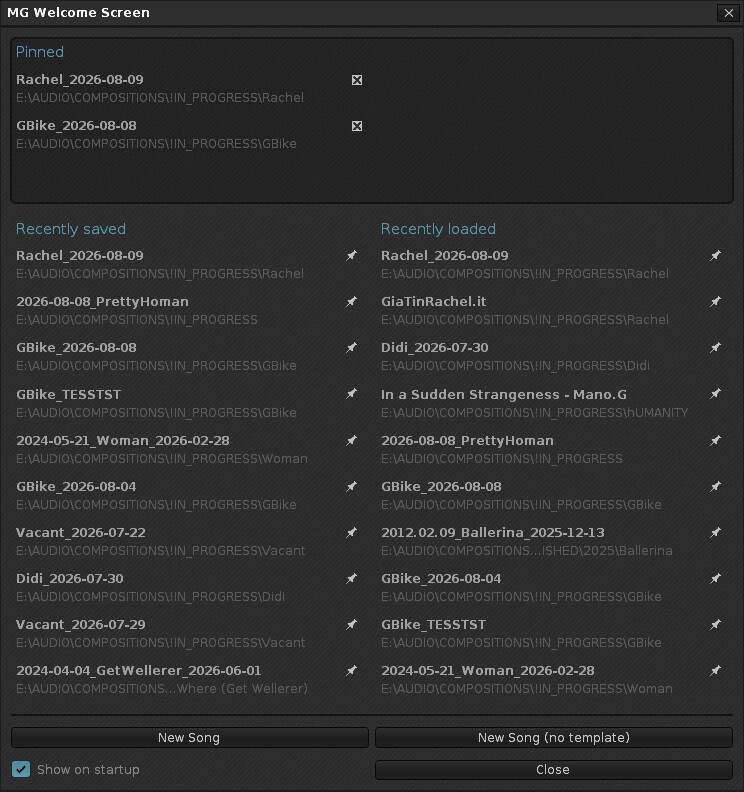 DISCLAIMER: The tool is made using Claude AI. Feel free to edit and reupload the script if you find any bugs (which is very very likely). Always make a backup copy of your song before testing. v.2 update - 2026-07-17: Pinned slots are now 6 instead of 5 / total UI overhaul v2.5 update - 2026-08-10: - Pinned section is now displayed only when pinned items exist - Added “Show on startup” checkbox - Minor UI improvements
MG Note & FX Inspector

MG Note & FX Inspector gives a live status‑bar readout that, as you move through the Pattern Editor, instantly translates whatever is under your cursor or selection into plain language — the instrument and mapped sample, phrase and sllice for notes, or the device, parameter, and real scaled value for effect commands. Especially useful when working with multi-sample instruments and DSP parameters in FX column. DISCLAIMER: The tool is made using Claude AI. Feel free to edit and reupload the script if you find any bugs (which is very very likely). Always make a backup copy of your song before testing. https://forum.renoise.com/t/new-tool-3-5-4-note-fx-inspector/79201 UPDATE v1.2 (2026-06-23): Added detection for sliced samples and phrases
MG Sample Batch Tool

A new tool to crop, reverse, fade, adjust volume, rename, auto position and expand note ranges to slots, and process multiple samples at once. V.2 update - 2026-07-15: Added option to reposition samples to the appropriate slots based on the filenames (C4, E_#_2, etc.) V.3 update - 2026-07-29: Added option to auto-epxand samples to fill empty slots between them Added option to remove x number of characters at the front or end of a sample's name Added option to select samples range based on name DISCLAIMER: The tool is made using Claude AI. Feel free to edit and reupload the script if you find any bugs (which is very very likely). Always make a backup copy of your song before testing.
MG Instrument Map

Interactive map of the song to quickly locate patterns and tracks containing notes from current instrument. This one was created mostly for old mod files, where multiple instruments were usually present in the same track. It comes in two modes, normal and small view. A striped cell means this column contains notes from the current instrument and others. Clicking a cell jumps straight to the specific pattern and column (and “highlights” it by marking it with a selection in order to spot it easily). DISCLAIMER: The tool is made using Claude AI. Feel free to edit and reupload the script if you find any bugs (which is very very likely). Always make a backup copy of your song before testing.
MG Volume Envelope

Sculpt and "print" volume envelope for the selected sample. Adds per-segment curve tension sliders and expanded curve types. DISCLAIMER: The tool is made using Claude AI. Feel free to edit and reupload the script if you find any bugs (which is very very likely). Always make a backup copy of your song before testing.
MG Sample Mix Tool

A collection of sample-mixing tools for combining, looping, inserting and crossfading audio. Sample Downmixer — Combines selected samples into one stereo sample, layered or sequentially. Sample Clipboard Looper — Fills or inserts repeated clipboard audio with adjustable crossfades. Crossfade Mix Paste — Mixes copied audio over existing audio using adjustable crossfade curves. ** Note about Crossfade Mix Paste and Sample Clipboard Looper: The current API does not allow the tool to read correctly cursor placement in sample editor, unless it is a selection, so in order for these tools to work properly, when placing the cursor at the desired point in the sample, just make even a tiny selection there in order for the tool to read the cursor "position". DISCLAIMER: The tool is made using ChatGPT AI. Feel free to edit and reupload the script if you find any bugs (which is very very likely). Always make a backup copy of your song before testing.
MG Inspector & Picker

MG Inspector & Picker gives a live status‑bar readout that, as you move through the Pattern Editor, instantly translates whatever is under your cursor or selection into plain language — the instrument and mapped sample, phrase and sllice for notes, or the device, parameter, and real scaled value for effect commands. Especially useful when working with multi-sample instruments and DSP parameters in FX column. DISCLAIMER: The tool is made using Claude AI. Feel free to edit and reupload the script if you find any bugs (which is very very likely). Always make a backup copy of your song before testing. https://forum.renoise.com/t/new-tool-3-5-4-note-fx-inspector/79201 UPDATE v1.2 (2026-06-23): Added detection for sliced samples and phrases UPDATE v1.5 (2026-08-08): - Changed name to MG Inspector & Picker - Readout can now be a combination of sample info along with volume/pan/delay/fx - Volume/pan/delay/fx on rows with empty notes are now captured and shown in the status bar in hex and their respective "real" values - Key binding to jump to sample/slice/phrase/device when cursor is on a note or a parameter value in FX column - Key binding to pick octave and instrument from current note - Key binding to set current octave from selected sample - In sample editor, the status bar read out shows current selection in beats/ms/frames
MG Linker Mixer

Links track volume, pan, mute and solo controls into independent groups for fast mixer-wide control - supports MIDI Mapping. (Due to API limitations, if you want to assign a MIDI mapping to volume or pan, you'll have to click on the VOL and PAN labels and not on their faders) v2.0 update - 2026-08-18: -NEW FEATURE: Added 4 snapshot slots to store groups, volume and pan configurations -NEW FEATURE: Added option to influence neighbouring volume faders with adjustable fall-off -NEW FEATURE: When working in "Pre" mode, right clicking a pan or volume fader writes automation for selected and linked tracks -Current track is now highlighted and selection syncs to the pattern editor/mixer 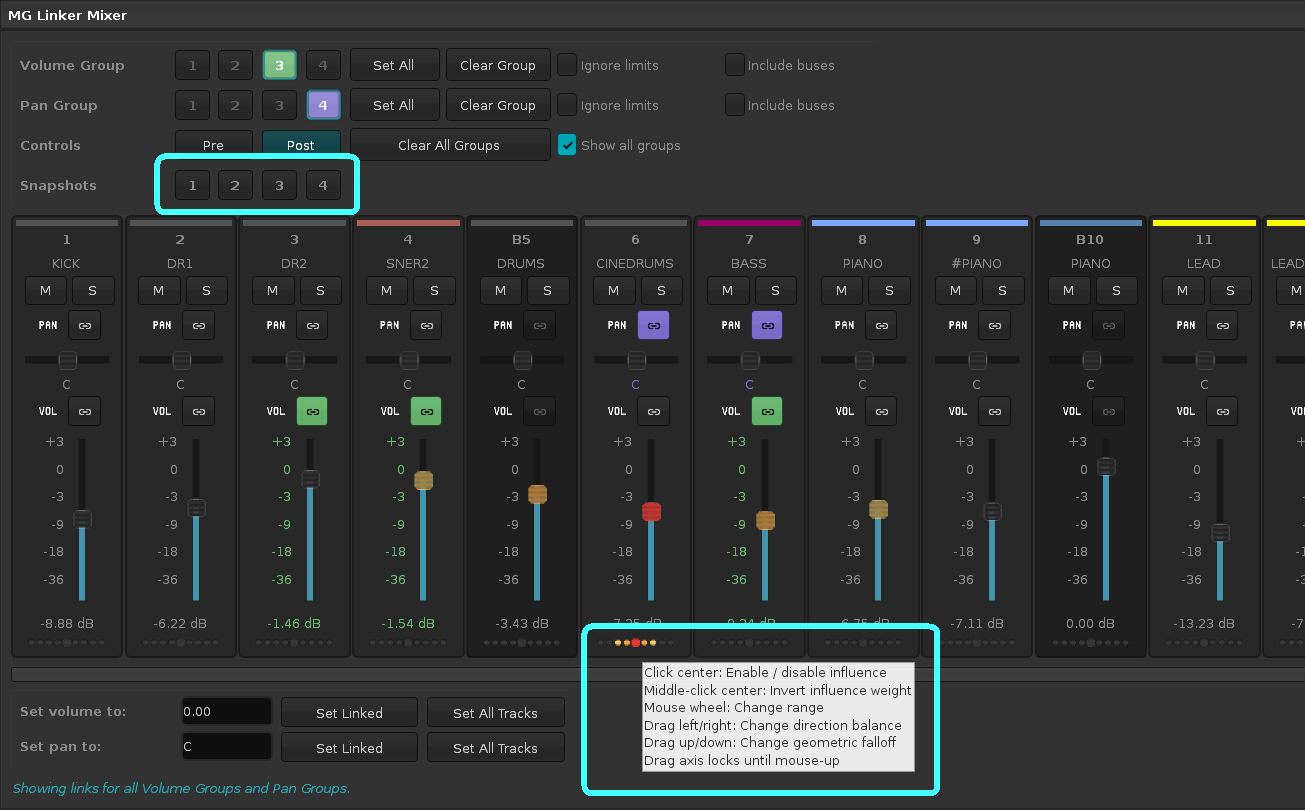 DISCLAIMER: The tool is made using Claude AI. Feel free to edit and reupload the script if you find any bugs (which is very very likely). Always make a backup copy of your song before testing.
MG Compact Recorder Strip

A compact recording toolbar for quick live audio recordings, and option to solo a selected track during takes. The record button flashes in sync with the BPM of the song (above 130 BPM, it flashes every two beats).